As digital payments become a central part of daily life — from online shopping and mobile money transfers to contactless card payments and QR‑based checks — so do the security risks that come with them. In 2026, financial technology (fintech) innovations make transactions fast and convenient, but this also attracts fraudsters, hackers, and other threats. Understanding the risks and learning how to protect yourself can keep your money and personal information safe.
This article explains common security risks associated with digital payments and offers practical tips to stay safe, whether you’re using a mobile wallet, online banking, or point‑of‑sale systems.
What Are Digital Payments?
Before we dive into risks, it helps to define digital payments. These include any electronic method of moving money or authorising a purchase without using physical cash. Examples include:
- Mobile money (e.g., M‑Pesa, MTN Mobile Money)
- Mobile wallets (e.g., Apple Pay, Google Wallet)
- Online banking transfers
- Contactless card and QR code payments
- E‑commerce checkout systems
While these methods streamline how money moves, they also expose users to cybersecurity challenges that weren’t as common with cash transactions.
Common Security Risks in Digital Payments
1. Phishing and Social Engineering
Phishing occurs when fraudsters pretend to be trusted services (banks, mobile money providers, or apps) to trick you into revealing passwords, PINs, or verification codes.
Example: A text message that looks like it’s from your mobile money provider asks you to enter your PIN to “confirm a payment.” Once entered, the scammer gains access to your account.
2. Malware and Spyware
Malware is malicious software that can infect smartphones, tablets, and computers. It can:
- Record keystrokes (capturing passwords and PINs)
- Redirect payments to fraudster accounts
- Trigger unauthorized transactions without your knowledge
Malware often arrives through fake apps, suspicious downloads, or compromised websites.
3. Weak Passwords and Credentials
Simple or repeated passwords make it easier for hackers to access your accounts. If you use the same password across multiple services, a breach on one platform can compromise others.
4. Unsecured Wi‑Fi Networks
Public Wi‑Fi networks (e.g., in cafes, airports, or hotels) are convenient but often unsecured. Hackers can intercept data sent over these networks, including payment details and login credentials.
5. SIM Swap and Account Takeover
In a SIM swap attack, fraudsters convince a mobile carrier to transfer your phone number to their SIM card. Once they control your number, they can intercept one‑time passwords (OTPs) and two‑factor authentication (2FA) codes — essentially bypassing many security checks.
6. Data Breaches at Payment Providers
Even when you practice good security, a data breach at a payment provider, bank, or fintech company can expose your information. This includes leaked email addresses, phone numbers, and encrypted or unencrypted payment credentials.
How to Protect Yourself: Best Practices
Staying safe with digital payments requires both smart habits and technical safeguards. Below are practical tips you can use immediately.
1. Use Strong, Unique Passwords
- Create long passwords using a mix of uppercase, lowercase, numbers, and symbols.
- Avoid using the same password for multiple accounts.
- Consider using a reputable password manager to keep track of complex passwords.
Why it helps: Strong, unique passwords make it much harder for attackers to break into your accounts, even if one service is compromised.
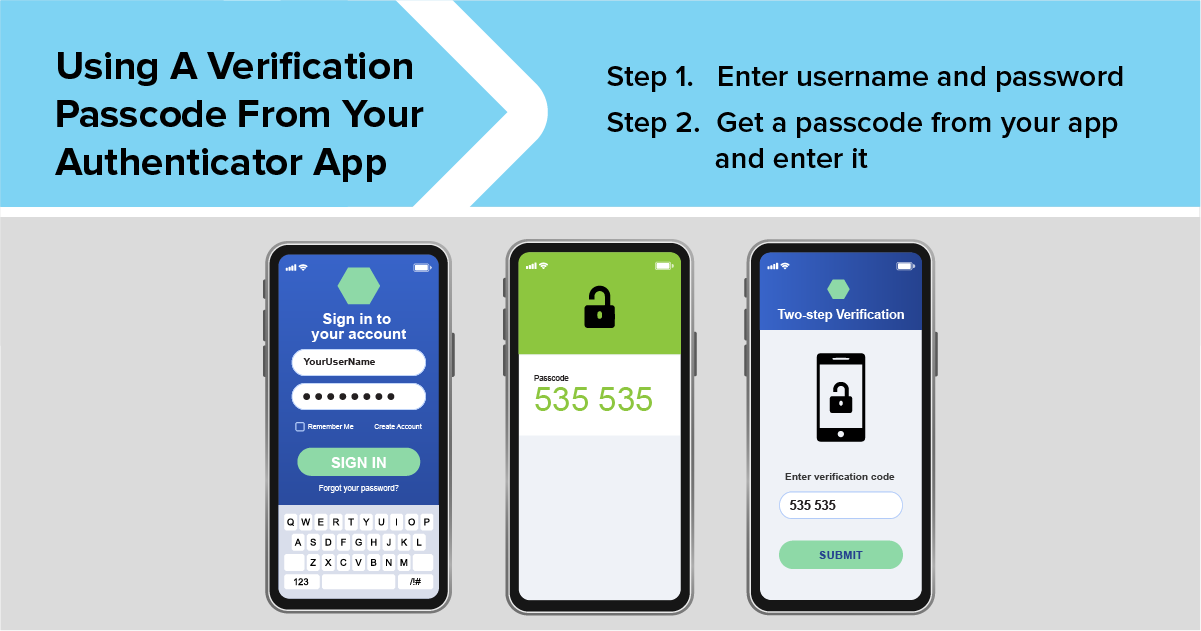
2. Enable Two‑Factor Authentication (2FA)
2FA adds an extra layer of protection by requiring a second verification step — typically a one‑time code sent to your phone or generated by an app (e.g., Google Authenticator).
Why it helps: Even if someone steals your password, they won’t be able to access your account without the second authentication factor.
3. Keep Software Updated
Always install updates for your operating system, banking apps, and payment wallets.
Why it helps: Updates often include security patches that fix vulnerabilities hackers could exploit.
4. Avoid Public or Unsecured Wi‑Fi
When making digital payments or accessing financial accounts, use your mobile data or a trusted, secure Wi‑Fi network.
Why it helps: Unsecured networks make it easy for attackers to intercept data transmitted between your device and internet services.
5. Be Wary of Suspicious Messages
- Don’t click on links or download attachments from unknown sources.
- Verify messages that ask for personal or financial information by contacting the service directly (not via an unknown link).
Why it helps: Phishing scams often rely on urgency and emotion to trick users. Slow down and verify before acting.
6. Install Security Apps
Use reputable antivirus or mobile security apps to detect malware and unsafe websites.
Why it helps: These tools offer an extra layer of real‑time protection, scanning for malicious behaviour.
7. Monitor Your Accounts Regularly
Check your transaction history and account activity often. Report any suspicious charges immediately to your provider or bank.
Why it helps: Quick detection of unauthorized transactions can limit your losses and prevent further fraudulent activity.
8. Set Up Transaction Limits and Notifications
Many mobile money and digital banking platforms let you set spending limits or receive instant notifications for every transaction. Activate these features when available.
Why it helps: Notifications alert you to activity as it happens, helping you catch unauthorized transactions sooner.
What to Do in Case of Fraud
Even with precautions, fraud can still happen. Here’s how to respond:
1. Contact your provider immediately.
Report the suspected fraud to your bank or payment service provider.
2. Freeze or block accounts.
Many providers allow temporary freezes on wallets, cards, or accounts to prevent further unauthorized access.
3. Change your credentials.
Update passwords and review which devices are logged in.
4. Report to regulatory authorities.
In many countries, fraud reporting hotlines or consumer protection agencies exist to help victims.
The Role of Regulation and Industry
Governments and regulators are working to strengthen digital payment security through guidelines, licensing requirements, and infrastructure standards. Meanwhile, payment providers continue to innovate with biometric authentication, tokenisation, and machine‑learning fraud detection.
Tokenisation (replacing sensitive data with unique tokens) ensures that even if payment data is intercepted, it cannot be reused by attackers.
Digital payments make financial transactions convenient and efficient, but they also bring security risks that require awareness and proactive protection. By using strong passwords, enabling advanced authentication, avoiding unsecured networks, and monitoring your accounts, you can significantly reduce your exposure to fraud and cyber threats.
In 2026 and beyond, staying safe in a digital financial world means combining smart behaviour with the right tools — so you can enjoy the benefits of digital payments without compromising your security.